Curated, High-Contrast Sets
156 hand-tuned gradients cover structural, scientific, painterly, neon, metallic, and natural color families.


Version 3. Mandelbrot Metal 3 is available for iPhone and iPad. Explore free with the Infinity Engine and all 156 built-in palettes; choose Pro for expanded creative tools and output. Requires iOS 26 or iPadOS 26 or later.
Free includes 156 built-in palettes, including 55 Ultra-Wide ramps with 768 source stops. Pro adds photo-derived and custom palettes with import and export. This guide explains the path from a palette definition to the final fractal color, and how to choose settings deliberately.
Filter the picker by All, Standard, Ultra-Wide, or Custom. Favorites are kept by palette name and shown ahead of non-favorites.
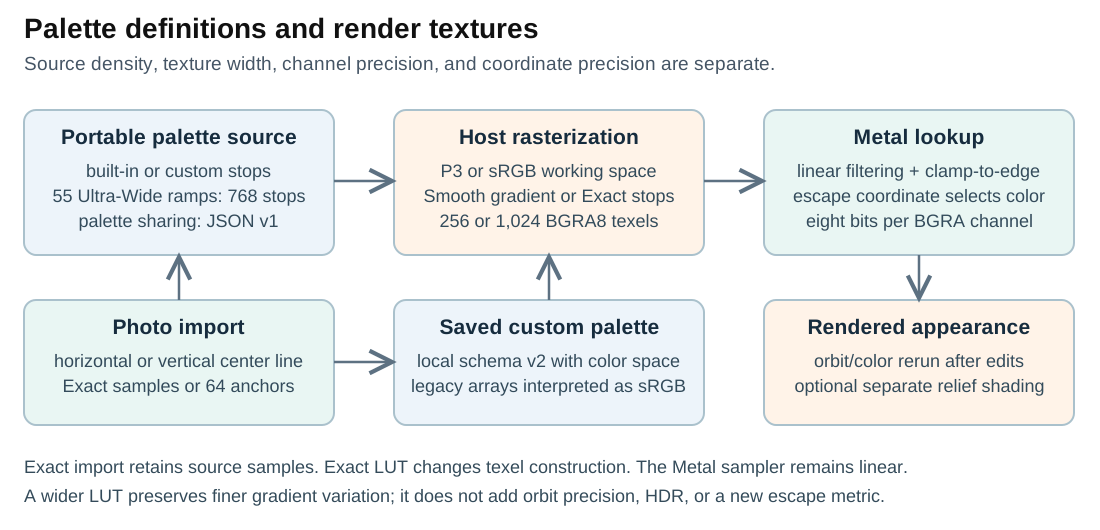
Choose a source palette, rasterize its colors into a 256- or 1,024-texel lookup table, and let the renderer sample that table from the escape coordinate. Source stop count, texture width, color space, and fractal-coordinate precision are separate choices.
156 hand-tuned gradients cover structural, scientific, painterly, neon, metallic, and natural color families.
Standard definitions have varying numbers of source stops; some are precomputed ramps. Each Ultra-Wide definition contains 768 stops. Named and custom sources are rasterized to the selected 256- or 1,024-texel Metal texture. The source is not universally a 512-step table, and the renderer does not force every texture to 1,024 texels.
Sample a horizontal or vertical center line through a photo or artwork, preview the result, and save a custom palette. Crop or rotate the image first to choose the colors that cross that line.
Move your custom palettes between iPhone and iPad or share with others via Files/Messages/Mail.
Smooth draws a continuous gradient into the texture. Exact LUT assigns the nearest source stop to each texture texel. Metal still uses linear filtering when sampling either texture, so Exact does not mean nearest-neighbor filtering in the shader.
Choose Display-P3 for supported wide-gamut screens and workflows, or sRGB for broad compatibility.
Mark favorites and browse a fast thumbnail grid.
More (…) → Manage Palettes: swipe a custom palette toward the leading edge to reveal Delete.
Compare palettes on your current composition. Color changes request a fresh orbit-and-color render, so a demanding deep view can take time to settle.
The strips illustrate dense and sparse color variation. They are not captured app output or a measured comparison. Actual banding depends on the source colors, texture width, interpolation, escape values, contrast, and display.
A wider LUT retains more variation along the gradient. It cannot add detail that was absent from the source or increase the precision of a fractal coordinate.
Enabled selects a one-row texture with 1,024 texels; disabled selects 256. The renderer uploads that actual width. At four bytes per BGRA texel, the raw row is 4 KiB or 1 KiB before resource overhead. A denser table can preserve subtle gradient variation; it is not a universal performance or smoothness guarantee.
Exact LUT chooses the nearest source stop while constructing each texel. Smooth uses a Core Graphics gradient. Both are then linearly sampled in Metal. Try Exact for deliberately stepped color and Smooth for blended transitions. Exact photo import is a separate choice: it controls how many sampled source stops are retained.
Display-P3 can represent colors outside the sRGB gamut and is used during palette construction and color conversion. sRGB is useful for common sharing workflows. A wider gamut does not mean more channel bits or smoother arithmetic. The active Metal LUT and output are BGRA8Unorm; the current implementation does not establish a scene-linear, HDR, or validated ICC round-trip pipeline. Check an exported PNG in its intended destination.
Open More (…) → Manage Palettes to manage your custom library. Use the palette row actions to export or delete an item, and the manager’s Import or Export All controls to transfer files. Built-in palettes are protected. The detailed User Guide covers the current phone and tablet controls.
Keep a palette JSON backup before deleting a custom palette. A bookmark that refers to it by name may need that file when opened on another device.
Export one or all of your custom palettes to share with others or move between your devices. Import brings them into your library.
Tip: Use Export All to back up your custom palette library or to sync between iPhone and iPad.
Browse a few built-in samples. Toggle Smooth vs Exact LUT to see rendering differences. See below for a complete sortable list of the available palettes.
Note: Palette names are unique. If you add a duplicate (e.g., “Chrome”), it becomes “Chrome (2)”, “Chrome (3)”, etc.
Showing 156 palettes. Only Name and Type are shown. Click a column header to sort.
| Name | Type |
|---|---|
| Ember | Fire / Heat |
| Fire | Fire / Heat |
| Fire & Ice | Fire / Heat |
| Hot Metal | Fire / Heat |
| Lava | Fire / Heat |
| Solar Flare | Fire / Heat |
| Amethyst | Gem / Jewel |
| Citrine | Gem / Jewel |
| Coral | Gem / Jewel |
| Emerald | Gem / Jewel |
| Jade | Gem / Jewel |
| Ruby | Gem / Jewel |
| Sapphire | Gem / Jewel |
| Carbon Fiber | Metallic / Glossy |
| Chrome | Metallic / Glossy |
| Chrome (2) | Metallic / Glossy |
| Chrome Glossy | Metallic / Glossy |
| Cold Steel | Metallic / Glossy |
| Cool | Pastel / Soft |
| Copper | Metallic / Glossy |
| Copper (2) | Metallic / Glossy |
| Copper Glow | Metallic / Glossy |
| Cybersteel | Metallic / Glossy |
| Gold | Metallic / Glossy |
| Gold (2) | Metallic / Glossy |
| Iridescent | Metallic / Glossy |
| Metallic Silver | Metallic / Glossy |
| Oil Slick | Metallic / Glossy |
| Oil Slick (2) | Metallic / Glossy |
| Polished Gold | Metallic / Glossy |
| Silver (2) | Metallic / Glossy |
| Binary Stripe | Monochrome / Utility |
| Icefire | Monochrome / Utility |
| Mono Ramp High | Monochrome / Utility |
| Mono Ramp Inverted | Monochrome / Utility |
| Noir Edge | Monochrome / Utility |
| Retro CRT | Monochrome / Utility |
| Royal HC | Monochrome / Utility |
| Sci-Fi Radar | Monochrome / Utility |
| Arctic | Natural / Atmospheric |
| Aurora | Natural / Atmospheric |
| Aurora Blade | Natural / Atmospheric |
| Aurora Borealis | Natural / Atmospheric |
| Deep Ocean HC | Natural / Atmospheric |
| Desert Dusk HC | Natural / Atmospheric |
| Glacier | Natural / Atmospheric |
| Midnight | Natural / Atmospheric |
| Ocean | Natural / Atmospheric |
| Peacock | Natural / Atmospheric |
| Polar Neon | Natural / Atmospheric |
| Sunset | Natural / Atmospheric |
| Sunset Glow | Natural / Atmospheric |
| Twilight | Natural / Atmospheric |
| Pastel Breeze | Pastel / Soft |
| Rainbow Hard | Rainbow / Cyclic |
| Rainbow Sharp | Rainbow / Cyclic |
| Rainbow Smooth | Rainbow / Cyclic |
| Smooth Rainbow (Cyclic) | Rainbow / Cyclic |
| Grayscale | Scientific / Utility |
| Heatmap High Contrast | Scientific / Utility |
| HSV | Scientific / Utility |
| HSV Hard | Scientific / Utility |
| HSV Thin Bands | Scientific / Utility |
| Inferno | Scientific / Utility |
| Inferno Hard | Scientific / Utility |
| Inferno+ (Gold) | Scientific / Utility |
| Magma | Scientific / Utility |
| Magma+ (Warm) | Scientific / Utility |
| Plasma | Scientific / Utility |
| Plasma Hard | Scientific / Utility |
| Turbo | Scientific / Utility |
| Viridis | Scientific / Utility |
| Viridis+ (Boosted) | Scientific / Utility |
| Sea Shells [UW] | Ultra-Wide 768 Step |
| Dresses [UW] | Ultra-Wide 768 Step |
| Eucalyptus [UW] | Ultra-Wide 768 Step |
| Hurst Pool [UW] | Ultra-Wide 768 Step |
| Guitar Player [UW] | Ultra-Wide 768 Step |
| Arenal [UW] | Ultra-Wide 768 Step |
| Bananas [UW] | Ultra-Wide 768 Step |
| Beach Sunset [UW] | Ultra-Wide 768 Step |
| Bridge [UW] | Ultra-Wide 768 Step |
| Begonias [UW] | Ultra-Wide 768 Step |
| Blown Glass [UW] | Ultra-Wide 768 Step |
| Bromeliads [UW] | Ultra-Wide 768 Step |
| Calf. Sunset [UW] | Ultra-Wide 768 Step |
| Chihuly [UW] | Ultra-Wide 768 Step |
| Car Show [UW] | Ultra-Wide 768 Step |
| Dragonfly [UW] | Ultra-Wide 768 Step |
| Gaia [UW] | Ultra-Wide 768 Step |
| Colorful Hats [UW] | Ultra-Wide 768 Step |
| Crab Nebula [UW] | Ultra-Wide 768 Step |
| Golden Sunset [UW] | Ultra-Wide 768 Step |
| Late Sunset [UW] | Ultra-Wide 768 Step |
| Lake [UW] | Ultra-Wide 768 Step |
| Blueberries [UW] | Ultra-Wide 768 Step |
| Blue Heron [UW] | Ultra-Wide 768 Step |
| State Street [UW] | Ultra-Wide 768 Step |
| Macaw [UW] | Ultra-Wide 768 Step |
| Misty Woods [UW] | Ultra-Wide 768 Step |
| Marquis [UW] | Ultra-Wide 768 Step |
| Moonstone [UW] | Ultra-Wide 768 Step |
| Mt. Dora [UW] | Ultra-Wide 768 Step |
| Naples Sunset [UW] | Ultra-Wide 768 Step |
| Orchid [UW] | Ultra-Wide 768 Step |
| Abstract [UW] | Ultra-Wide 768 Step |
| Bookstore [UW] | Ultra-Wide 768 Step |
| Cambria [UW] | Ultra-Wide 768 Step |
| Crazy Patterns [UW] | Ultra-Wide 768 Step |
| Jupiter [UW] | Ultra-Wide 768 Step |
| Jubilant Days [UW] | Ultra-Wide 768 Step |
| Jade [UW] | Ultra-Wide 768 Step |
| Monet Flowers [UW] | Ultra-Wide 768 Step |
| Mashup [UW] | Ultra-Wide 768 Step |
| Plants [UW] | Ultra-Wide 768 Step |
| Galaxy Quest [UW] | Ultra-Wide 768 Step |
| Pedal Board [UW] | Ultra-Wide 768 Step |
| Paul Klee [UW] | Ultra-Wide 768 Step |
| Rain Clouds [UW] | Ultra-Wide 768 Step |
| Rainy Day [UW] | Ultra-Wide 768 Step |
| Redrum [UW] | Ultra-Wide 768 Step |
| Roji-en [UW] | Ultra-Wide 768 Step |
| Sarchi [UW] | Ultra-Wide 768 Step |
| Spectrum [UW] | Ultra-Wide 768 Step |
| Seurat [UW] | Ultra-Wide 768 Step |
| Starry Night [UW] | Ultra-Wide 768 Step |
| Volcanic Sky [UW] | Ultra-Wide 768 Step |
| Volcano [UW] | Ultra-Wide 768 Step |
| Acid Dream | Vivid / Artistic |
| Blue-Orange Punch | Vivid / Artistic |
| Candy | Vivid / Artistic |
| Cosmic Fire | Vivid / Artistic |
| Cosmic Pop | Vivid / Artistic |
| Cyberpunk | Vivid / Artistic |
| Electric Blue | Vivid / Artistic |
| Electric Jungle | Vivid / Artistic |
| Electric Lime | Vivid / Artistic |
| Electric Sunset | Vivid / Artistic |
| Hypernova | Vivid / Artistic |
| Laser Lines | Vivid / Artistic |
| Laser Pop | Vivid / Artistic |
| Magenta Storm | Vivid / Artistic |
| Miami Lights | Vivid / Artistic |
| Miami Nights | Vivid / Artistic |
| Neon | Vivid / Artistic |
| Photon Flux | Vivid / Artistic |
| Solar Neon | Vivid / Artistic |
| Teal-Magenta Punch | Vivid / Artistic |
| Tokyo Nights | Vivid / Artistic |
| Tropical Heat | Vivid / Artistic |
| Tropical Punch | Vivid / Artistic |
| Ultraviolet | Vivid / Artistic |
| Ultraviolet Blaze | Vivid / Artistic |
| Vaporwave Edge | Vivid / Artistic |
| Vibrant | Vivid / Artistic |
| Vivid Neon | Vivid / Artistic |
The orbit calculation supplies a smooth escape coordinate. Normalization and contrast remap it into a palette position. A named gradient then provides color through its lookup texture; the HSV, Fire, and Ocean shader branches can also generate color procedurally.
The orbit and color calculation share the primary compute pass. There is no persistent escape-value texture for palette-only recoloring. With 3D Look enabled, a separate relief pass shades that color using neighboring height samples.
Under supersampling, each subpixel performs its own orbit and palette lookup before the stored color components are averaged. The eight-bit normalized pipeline does not make this a scene-linear light average.
Gradient Import samples the center row or column of an RGBA8 working image. The current LUT-width setting supplies the sample count: 1,024 by default, or 256 with the lower-resolution setting. This is center-line sampling, not automatic extraction of the most common colors in the whole photograph.
The Version 3 defaults are Display-P3, saturation 1.12, gamma 0.95, and enabled 1.2× value stretch. Processing adjusts HSV value with gamma, multiplies saturation, optionally stretches value around its midpoint, and converts back to RGB. These controls change the sampled palette creatively; they do not change the renderer’s light model.
Compact import retains 64 evenly spaced anchors. Exact import retains all sampled stops. You can still choose Exact LUT or Smooth later when constructing the rendering texture.
The Photo2Palette command-line utility uses the same Version 3 defaults and can export JSON or developer Swift data. It also accepts explicit source and anchor counts. Its file output is a palette definition, not a pre-rendered fractal or an HDR image.
Continue with the rendering pipeline or the technical white paper.