
Provides Advanced Palette Creation From Photos
I think that Mandelbrot Metal’s power users should have more control over palette creation. The in-app Import Gradient feature is fast, friendly, and great for quick results — but many of you want deeper control:
Wider palettes, finer sampling, precise extraction from specific regions of an image, and the ability to generate perfectly structured JSON palettes for complex workflows.
So I’m making something new available.
Today, I’m releasing Photo2Palette, an open-source command-line utility designed for technical users and artists who want complete control over the process of building Mandelbrot Metal–compatible palettes.
👉 GitHub Repository: https://github.com/MDStebel/Photo2Palette
Why I Built This
Mandelbrot Metal’s renderer is capable of extraordinary color precision — especially with ultra-deep zooms and 768-step Ultra-Wide palettes. But generating palettes with that level of nuance inside the app is intentionally simple: pick a gradient, import it, and go.
That simplicity comes with limits:
- You can’t sample more than a few hundred steps
- You can’t precisely isolate a region of an image
- You can’t preprocess, blur, crop, or grade the source
- The app does not expose the intermediate color data
- You can’t script or automate palette generation
- Developers and power users can’t plug palettes into automated workflows
Photo2Palette addresses all of these constraints by giving you robust access to the palette-generation pipeline.
What Photo2Palette Does That the In-App Importer Does Not
1. Ultra-Wide Palette Generation (Up to 768+ Steps)
This was the original motivation.
Mandelbrot Metal’s built-in importer samples gradients, but it can’t produce the ultra-wide palettes used by many of the app’s built-in sets.
Photo2Palette can.
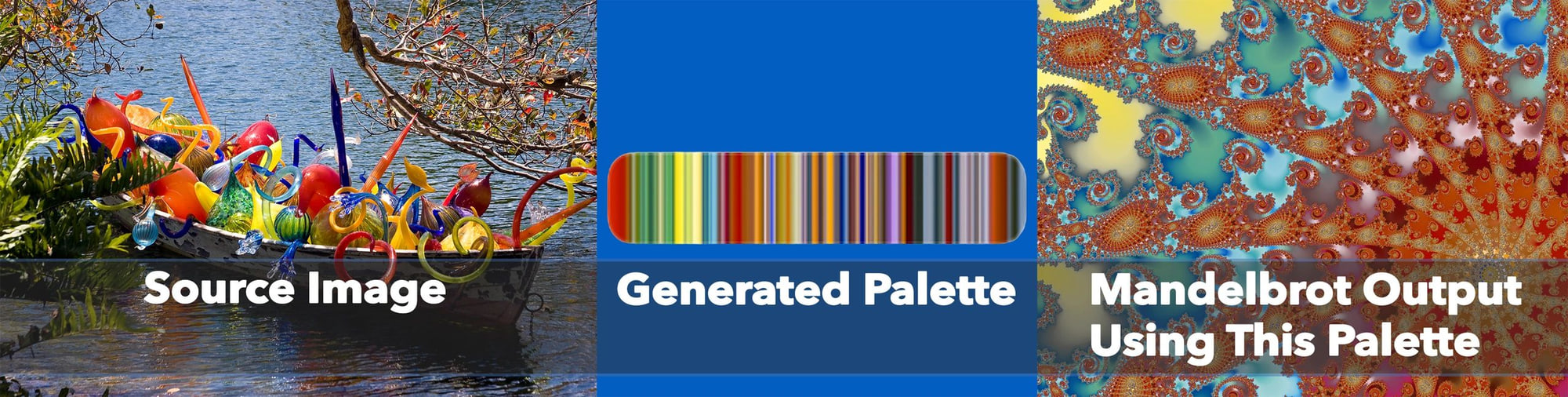
You can generate anything from a compact 32-step micro-palette to a full 768-step Ultra-Wide palette with razor-smooth transitions.
2. True Image-Based Sampling
Instead of relying on a constraint-based gradient renderer, Photo2Palette samples directly from any image you provide. This gives you:
- Real-world gradients
- Organic color flow
- Nebula-style transitions
- Photography-derived palettes
- High-contrast or low-contrast ramps, depending on the source
If you want palettes based on sunsets, nebulae, macro textures, digital art, or AI-generated imagery — this is the pipeline.
3. Precise Control Over Sampling Axes
You can sample horizontally, vertically, evenly, or with adjustable step spacing. This allows you to:
- Rotate your source image to capture the exact gradient direction
- Crop to isolate a thin strip of color
- Build palettes from a tiny, very controlled region
- Avoid noise, shadows, blown highlights, or unwanted colors
In other words, you choose the gradient — not the algorithm.
4. Automate & Script Your Palette Workflow
Photo2Palette is a CLI (Command Line Interface) by design. That means:
- You can batch-process thousands of source images
- You can include palette generation in your art pipeline
- You can automate seasonal or thematic palette packs
- You can include palette generation in fractal-art scripts
- …and developers can even integrate it into automated workflows (like GitHub Actions) if they need fully reproducible palette generation, for example.
All outputs are deterministic, structured, and ready for Mandelbrot Metal.
5. JSON Output 100% Compatible with Mandelbrot Metal’s Import System
Photo2Palette outputs the exact .json structure imported via:
Manage Palettes → Import…
You can import your generated palette immediately and use it:
- As your active palette
- Inside bookmark exports
- As part of a shared pack
- Inside the upcoming Community Portal
- Or in future versions of Mandelbrot Metal across iPhone, iPad, and macOS
This CLI essentially gives you a professional-grade palette authoring tool.
Sending Me Your Palettes (I May Feature Them)
The Community Portal Preview already includes downloadable/importable bookmarks and palettes — and I’d love to feature user-generated palettes created with this tool.
If you create something beautiful, unusual, or technically interesting, I’m happy to consider it for inclusion.
Just email your .json palette file to:
📧 community@mandelbrot-metal.com
I’ll review it, test it, and if it fits technically and artistically, I may feature it on the Community Portal Preview page with credit and any short notes you want to include.
Open Source & Community Driven
Photo2Palette is fully open-source under MIT license.
Feedback, PRs, issues, and improvements are welcome.
This tool is for the advanced users who love going deeper — the people who push Mandelbrot Metal beyond the defaults, who experiment with color, and who want to create something uniquely theirs.
If that’s you, jump in.
👉 https://github.com/MDStebel/Photo2Palette
Happy palette crafting — I can’t wait to see what you create.