

How Real-Time Fractal Rendering Works
Real-time fractal rendering is one of the most demanding visual workloads you can run on a device. Every pixel is the result of iterating a complex-number equation—again and again—until the viewer zooms, pans, or changes a parameter.
In Mandelbrot Metal, all of this happens live on iPhone and iPad using a purpose-built GPU pipeline built with Apple’s Metal® framework.
This article takes you behind the scenes of how that pipeline works and why it delivers fluid, ≥60-FPS exploration of one of the most intricate objects in mathematics.
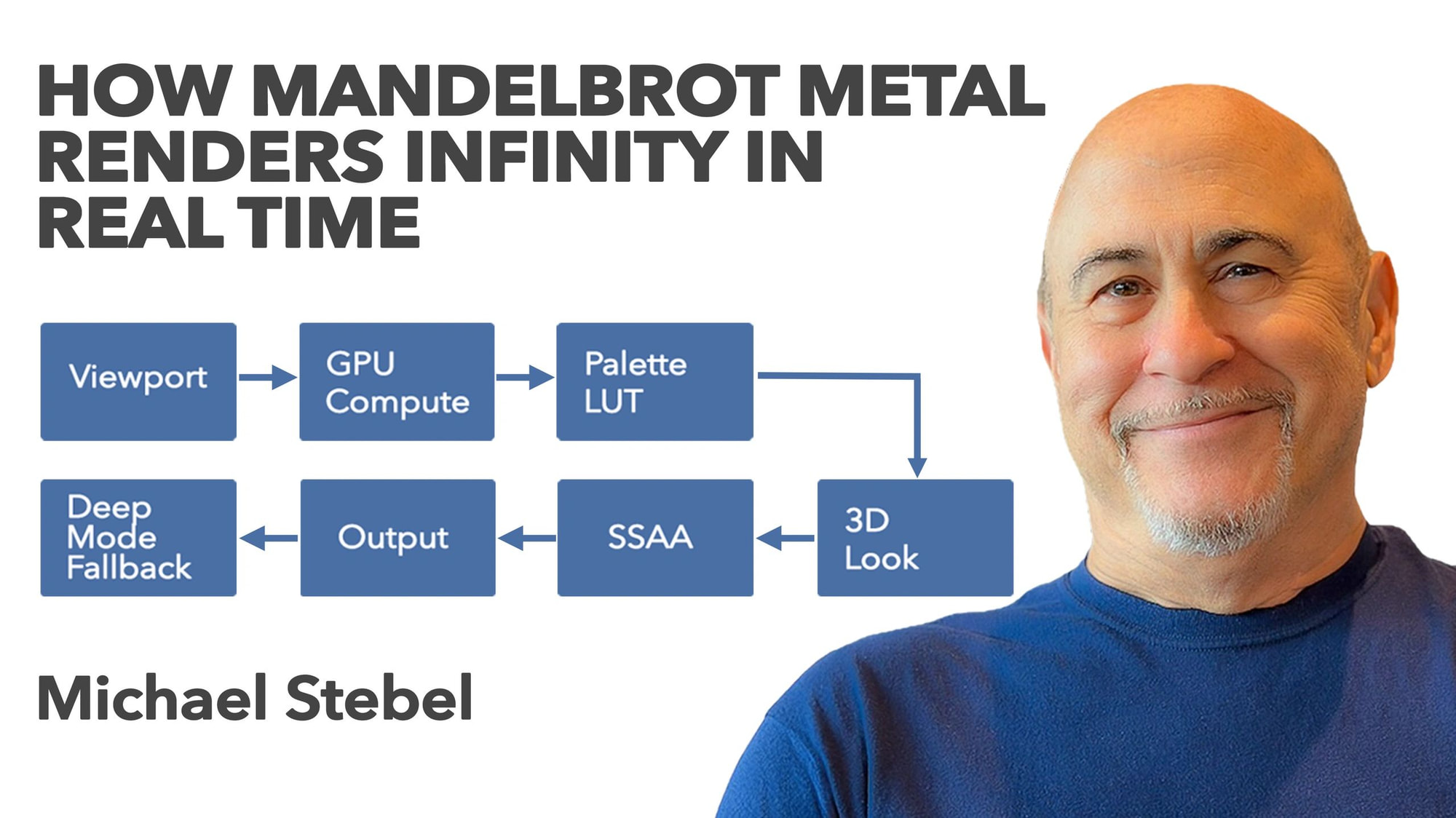
1. The Viewport: From Gesture to GPU Command
Every frame begins with a simple question: What part of the complex plane is the user looking at right now?
When you pinch, pan, or double-tap, the app updates the viewport:
- Complex center point
- Magnification (pixels → complex units)
- Aspect ratio
- Iteration cap
- Palette / LUT selection
- 3D Look lighting parameters
This data is packed into a uniform buffer and pushed to the GPU at the start of each frame. It tells Metal exactly how to transform each screen pixel into a complex coordinate.
2. GPU Compute: One Pixel, One Thread
At the heart of each frame is a massive compute pass.
The GPU launches tens of thousands of threads.
Each thread handles one pixel:
1. Convert pixel (x, y) into a complex coordinate c
2. Iterate:
3. Stop if |z| escapes past 2, or if max iterations has been reached
4. Record:
- Escape iteration
- Smoothed escape value
- Orbit data used for shading
Because the Mandelbrot formula is purely mathematical and independent per pixel, it maps perfectly to GPU parallelization. Every thread runs the same loop, just with different starting values.
This is where Metal shines:
Thousands of SIMD-friendly threads executing identical math in lockstep.
The result is a texture containing escape metrics—like a grayscale heightmap representing how fast (or if) each point escapes.
3. The Palette Engine: Color as a 1D Lookup Table
Fractal coloring is a creative art, but the computation behind it needs to be extremely efficient.
Mandelbrot Metal uses a 1024-tap unified LUT pipeline:
- Standard palettes (512 steps)
- Ultra-Wide palettes (768 steps)
- Future palette formats
- All mapped into a single consistent 1024-step range
This guarantees that the GPU performs the same simple lookup regardless of palette size:
- Normalize the escape value
- Find its position in the LUT
- Interpolate between neighboring color taps
- Output the final pixel color
This architecture is both flexible and fast—perfect for real-time interaction.
4. 3D Look: Real-Time Surface Shading
Mandelbrot Metal includes a feature called 3D Look, which gives fractals sculpted contours, depth cues, and lighting.
In this mode, the escape data acts like a height field.
The GPU computes:
- Surface normals
- Diffuse and ambient lighting
- Optional specular tone
- Light direction based on user controls
The shading model is lightweight by design—optimized for mobile GPUs—yet visually transformative. It brings out ridges, valleys, and textures that would otherwise remain hidden.
This entire shading pass happens during the compute pipeline, with no second render stage.
5. Wide Color, HDR, and Dithering
Modern Apple devices support:
- Display-P3 (wide color)
- HDR rendering
- High dynamic range brightness
Mandelbrot Metal automatically adapts the output pipeline to the device’s color profile.
A subtle dithering step smooths gradients and reduces banding—especially important for Ultra-Wide palettes that span hundreds of colors.
6. Super-Sampling (SSAA)
When enabled, Mandelbrot Metal renders internally at higher resolution (for example, 2× in each dimension) and then downsamples.
This improves:
- Boundary clarity
- Fine filaments
- Anti-aliasing
- Perceived detail
SSAA is expensive, so it’s intelligently applied based on device capabilities.
7. Presenting the Frame
Once the compute pass is complete:
- The GPU writes the final RGBA texture
- It’s presented directly to a Metal layer
- The UI overlays render with SwiftUI
- Everything updates synchronously at display refresh
This produces the trademark real-time feel:
Responsive, sharp, and continuous exploration.
8. When GPU Math Isn’t Enough: Seamless Deep Mode
At extreme zoom levels, single-precision (FP32) math reaches its limit. Beyond a certain depth, rounding errors are unavoidable.
When the app detects this, it automatically switches to Deep Mode:
- Multi-core CPU renderer
- Double and Double-Double precision
- Progressive tile-painting
- Same color pipeline as the GPU path
- Smooth transition in and out
The GPU continues handling the UI while the CPU computes high-precision tiles.
This hybrid architecture balances speed with mathematical correctness—delivering both instant responsiveness and deep exploration.
Why This Matters
Real-time fractal rendering isn’t just visual; it’s computational art. The GPU pipeline in Mandelbrot Metal exists to make mathematics immediate—to let anyone explore infinite complexity with fluid precision, on a device that fits in your pocket.
The combination of Metal compute, unified palette LUTs, real-time shading, wide color output, and CPU fallback forms an engine tailored specifically for fractal exploration.
It’s a pipeline built for one purpose:
Make infinity feel interactive.